Tasking System
The tasking system allows the FlyPix platform to handle complex, assisted semi-automatic workflows while allowing you to monitor their state and manage any errors that come of it.
Effectively, you can imagine them as an overview over a simulation of actions you could take yourself from within the application.
The main place Tasks are in use at this time in the application is the GeoJSON import system. So that is what we will be using in these upcoming examples.
When you import a brand new GeoJSON file as annotations, many actions often need to take place.
- If you didn't select an existing layer, one must be created.
- If any of your annotations have a class that doesn't exist in your project, those classes must be imported.
- Then each of your annotations must be imported into the platform.
All of this can get quite complicated and is fairly error-prone, especially given malformed data or other possible errors.
For this purpose, the Tasking System has been created with speed and robustness in mind.
As the user, your interaction with the tasking system will always be through a Task Loader.
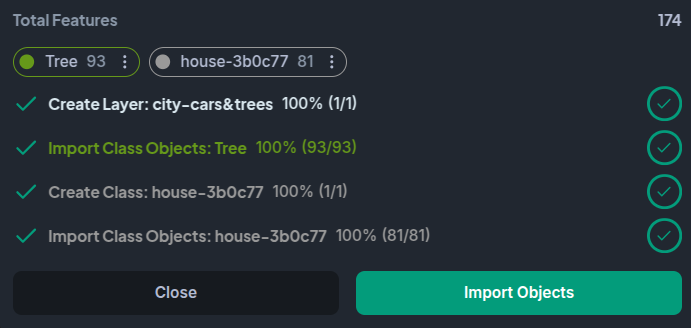
Here, you can see each individual task that took place, along with a spinner representing its current progress.
Error Handling
If any errors occur in the execution of any tasks, most of them will be retried and executed again automatically, but if they persist, you'll see something like this:
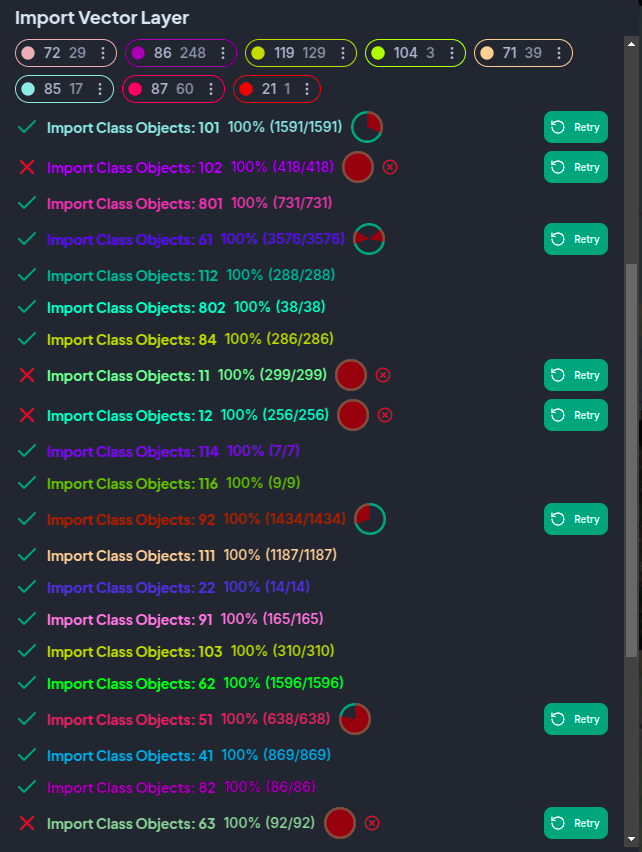
The image above was created by forcefully adding random failures into the import pipelines. The amount of errors you see above are unrealistic.
The red overlays over the spinners represent the parts of tasks that failed. In some cases, tasks can succeed with some failures and still allow your operations to continue. This is typically the case of corrupted or malformed geometries that are not caught by our geometry screening pass.
You can also hover over the spinner to see a located list of errors that affected the task.
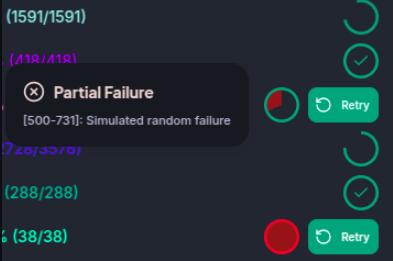
You can also manually retry individual tasks or retry all failed and partially failed tasks from the task loader.
Parallelism
For the sake of speed, most tasks are executed using multiple workers, each managing multiple simultaneous requests to our back end services.
This results in much faster operations. Tasks also have a dependency system, so if any tasks need to be finished before other starts, they will automatically wait for the output of dependencies before executing.
Attempting to retry a task with a failed dependency will fail with an informative error displayed as a toast.