Properties
Properties are data associated with certain objects. There are many kinds of properties, this article will go over each of them, what makes them different, and what you can use them for.
Data Properties
Data properties are perhaps the most intuitive of all properties. They are some mutable information that is largely independent from but associated to an object.
Annotation Data Properties
Data properties associated with annotation objects are the following. Note that these are the built-in properties every annotation has; a project can also define its own custom, schema-driven fields, covered separately in Custom Data Properties.
Class ID
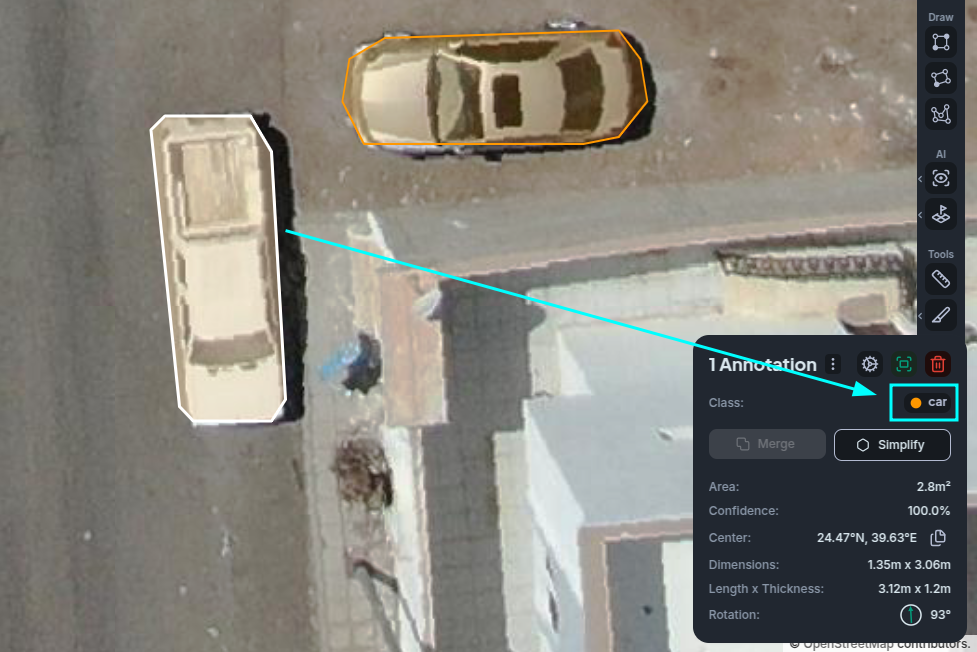
The class ID is the unique identifier of the class that the annotation belongs to this is the value that the annotation class, and thus its color, is derived from.
Classes are one of the most fundamental properties in the entire application, as they tell you what an object is.
While the class ID is not directly exposed to you in the application, you can still see it if you include it in a data export operation. Most of the time, though, you'll be interacting with classes as a whole.
Most of the application will group annotations by their class. You can see what class an annotation belongs to by selecting it and looking at the inspector. You can also change the class of an annotation from this same inspector field.
Vector ID
The vector ID is the unique identifier of the vector layer that the annotation is contained in. While you can't directly change this, you can copy/cut and paste annotations across vector layers.
Confidence
The confidence is a percentage value (in the range ). It will be 1 by default in all annotations you manually create, but those created by any of our inference pipelines will provide you a confidence value as part of the output.
Region Data Properties
Regions also have associated data properties that belong just to them. And in practice it's quite a few more than annotations, since they're generally more complex, less used objects.
Name, Description, and Color
These properties exist purely for display purposes and for you to customize and identify regions however you wish, they have no side effects.
Training and Inference Behaviors
Region behaviors indicate how a region will interact with our training and inference pipelines. At this time, these behaviors are effectively an on/off switch to have them partake in either pipelines.
For example, a region with a training behavior but no inference behavior will be used to provide data to models in training but would not later be populated during a later inference-on-regions operation.
Derived Properties
Derived properties are quite distinct from data properties in that they cannot be directly changed. They are derived via some operation from some other property of an object. The following section describes each derived property and how they're calculated.
Area
Area is perhaps the most obvious derived property of any geometric object. Note that when we refer to area,
we may be talking about one of several types, depending on the context.
Spherical Area
The spherical area of an object is the area it covers, in square meters, on the surface of the Earth. It is calculated using spherical geometry on an approximated surface of the Earth. By the nature of how it is calculated, it may not always be perfectly accurate.
Whenever you see the area of an object in metric units (or imperial depending on your preferences), it is almost certainly this spherical area.
Planar Area
The planar area of an object is the direct, flat area of the polygon in metric coordinates. This area is not generally very useful and can be very far off of the spherical area due to projection distortions near the poles.
Pixel Area
The pixel area of an object is the amount of pixels it covers. This is generally used to calculate anything that relies on image processing, so by their nature it tends to be more practical to be used for regions.
Whenever you see an area expressed in pixels, this is what it represents. It is generally used to calculate the cost of trainings or inferences.
Extent-Related Properties
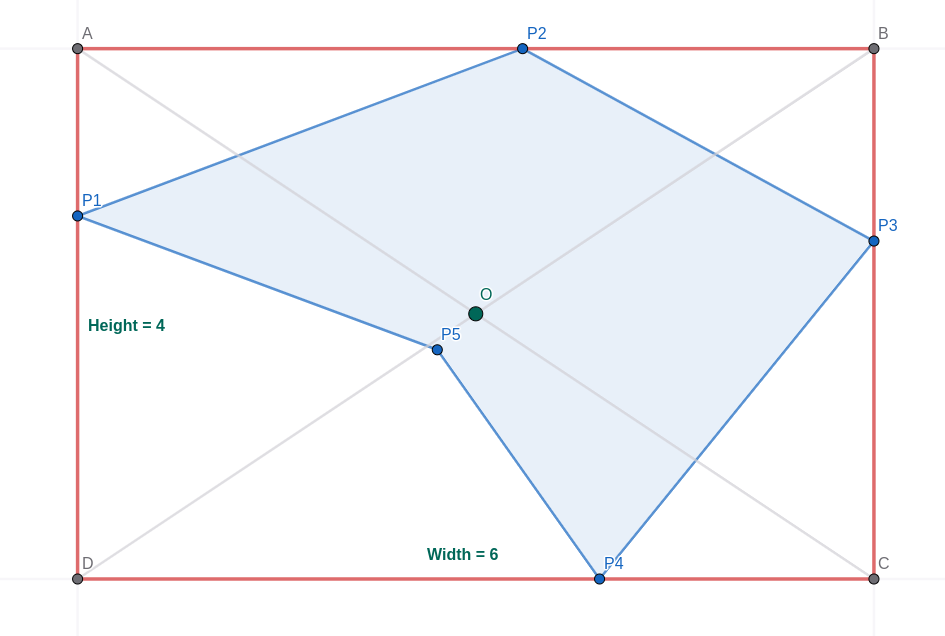
The following properties are derived from the extent an object covers, which is the smallest axis-aligned bounding box (AABB) that fully contains the object.
Width & Height
The width and height of an object is calculated as the horizontal (East-West) and vertical (South-North) dimension of the extent covered by the object.
Given an extent bound :
Center
The center of an object is the center of its extent.
Given an extent bounding box ABCD:
Oriented Bounding Box Properties
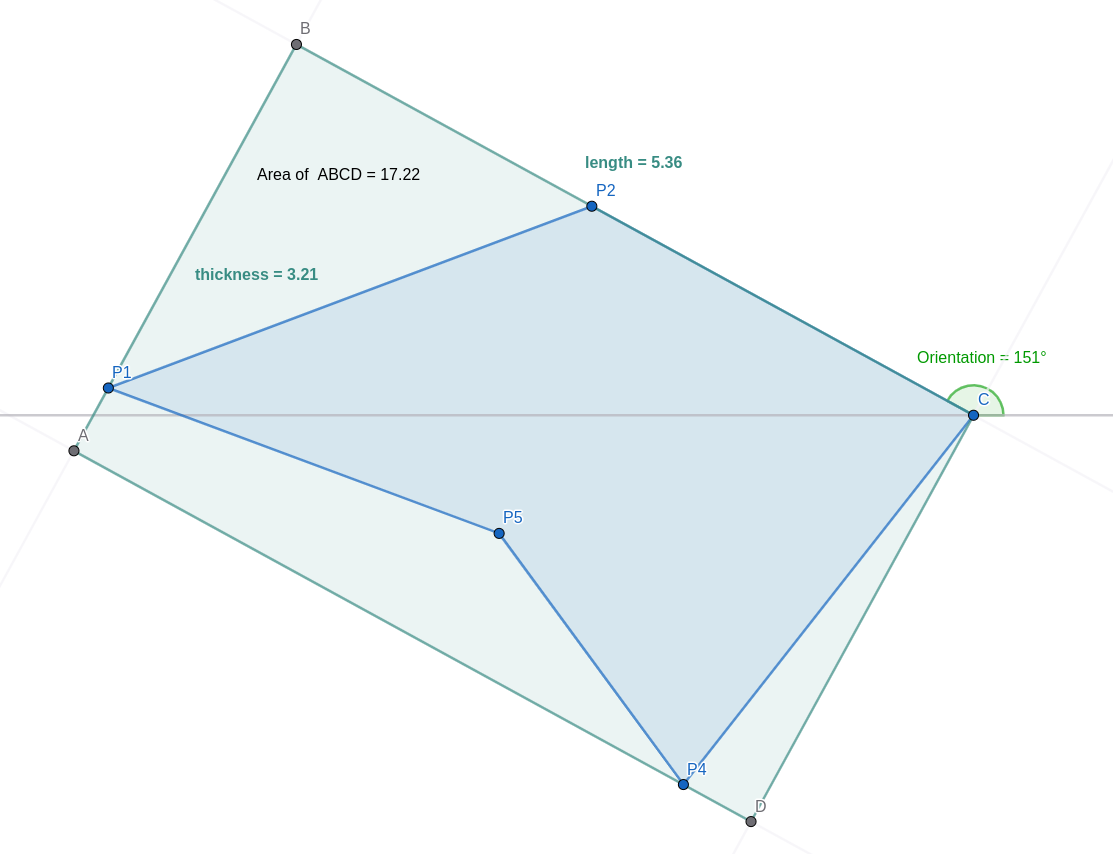
The following properties are derived from the minimum enclosing oriented bounding box (OBB) of the object, which is calculated using the Rotating Calipers Method.
For the mathematical expressions given below, consider to be the minimum enclosing OBB where .
Length & Thickness
Length and thickness are the larger and smaller dimensions respectively of the minimum oriented bounding box.
These are generally useful properties to know about elongated objects that aren't necessarily east-west or south-north aligned; such as roads or pipelines.
Orientation
The orientation is calculated as the angle formed between the vectors (an East-pointing vector) and the longest segment of the OBB. Since the longest segment is undirected, the angle in the 1st or 2nd quadrant is taken instead of that in the 3rd or 4th. This results in an angle in the interval .
We can use the dot product to easily find this value.
We define the orientation of an OBB ABCD as:
Minimum Enclosing Circle Properties
The following properties are derived from the minimum enclosing circle (MEC) of the geometry.
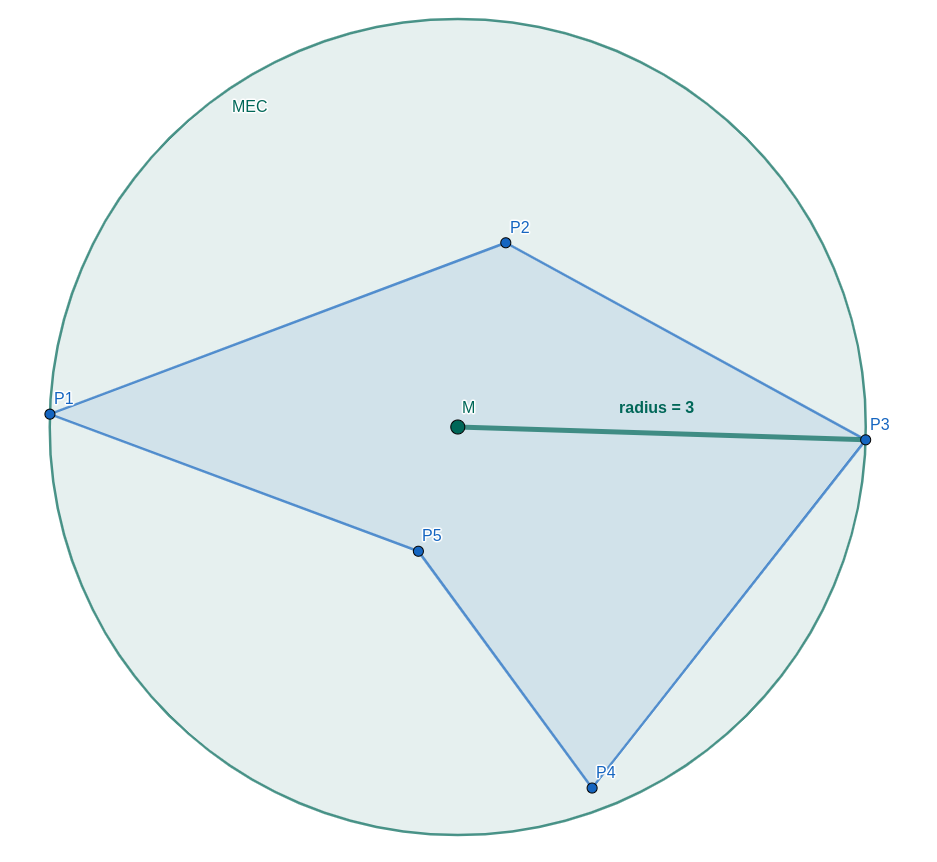
The minimum enclosing circle is the smallest circle that completely contains all points in the geometry. It can be calculated using Welzl's Algorithm.
Circumcenter
The circumcenter is a shorthand name for the center of the MEC.
We are not using "circumcenter" in the strict geometric sense here. The MEC is a less strict construction and will likely not match the circumcircle, if a circumcircle exists at all. The name given to it is simply to avoid writing "center of the minimum enclosing circle" repeatedly.
Radius
Ordinarily, the diameter of a polygon would be the maximum distance between any pair of its points. At this time, this metric is not provided to you, but instead we provide the radius as the radius of the MEC.
It can be calculated as follows, given the center of the MEC and any point on it.
Other Geometric Properties
The following properties are fairly independent from each other. They are compiled in this group for convenience.
Perimeter
The perimeter of a polygon is the sum of the lengths of all of its edges.
For a polygon , its perimeter is:
Centroid
We define the centroid of a polygon as the mean of all of its points.
For a polygon , its centroid is:
Vertex Count
The vertex count of a polygon is simply the number of vertices (corner points) that make it up.
For a polygon , its vertex count is:
Notes
If you are going to work with these properties, note that the definitions above are slightly simplified, and there are some edge cases. For example, for polygon with holes, we include the holes in calculations where there is a well defined behavior, such as for the area, perimeter, centroid, or vertex count. But they are ignored for all extent-, OBB-, and MEC-related calculations.
Also note that if you are exporting data in GeoJSON, each polygon ring includes the same point at the start and at the end, so you'll have to strip this point away if you are going to use the formulae stated above.