FlyPix Release: v3.4.0
Version 3.4.0 introduces annotation properties as a first-class concept, with two features built around them: the inspector can now display dynamically calculated properties per annotation, and the revamped GeoJSON export lets you select which properties to include and how to name them in the output file.
This release also improves raster quality for newly uploaded imagery by adding an implicit transparency channel, eliminating black-pixel artifacts at raster borders.
Changelog
New Features and Improvements
Users can now configure the inspector to show certain dynamically calculated annotation properties.
The GeoJSON export functionality has been completely revamped to provide entirely new ways to customize the way your data is exported. Check out details in the GeoJSON Export Deep Dive.
We have upgraded our processing to include an implicit transparency channel in newly uploaded rasters, which should remove reprojection and compression artifacts in the form of black pixels around the borders of rasters.
Fixes
Fixed a legacy compatibility issue preventing drawing regions on very old data. Very old data will still have issues with region validation.
Fixed a minor issue with class renaming causing the default form value to be "Unnamed Class" instead of the actual class name.
Deep Dives
GeoJSON Export
The GeoJSON export system has been revamped to work directly within the application, allowing you to export your data in a much more flexible way and even faster than before.
You can access it from the vector layer menu as you could before, but now you can also access it from the inspector when you have at least one annotation selected. This will allow you to export exactly what you need.
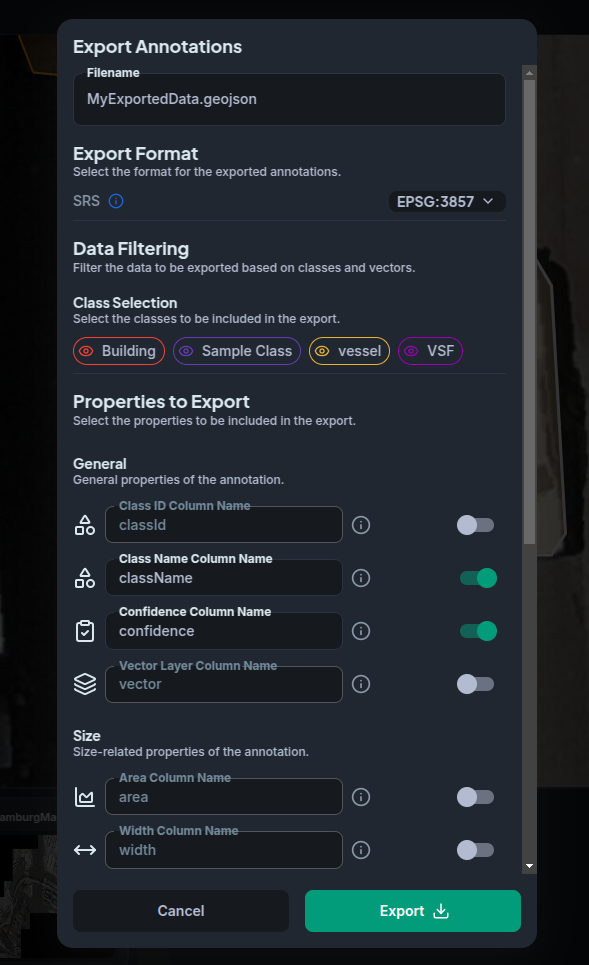
When you click export, you'll be presented with a new interface that will allow you to customize your export in a much more flexible way than before. You can filter which annotations to export by class or vector layer. Here, you will also be able to choose what CRS to export your data in, and which annotation properties to include in the exported GeoJSON file. You can even choose what name to use for each property!
For a full walkthrough of all export options, see the Export Vector Layers guide.